You have probably heard that AI can transform enterprise support. But transformation does not always mean starting over. In most cases, your support system does not need to be replaced. It needs to be improved carefully and strategically through a well-defined AI implementation roadmap for enterprises.
That is where AI fits in. You do not need to disrupt what already works. Instead, you can enhance existing workflows with more innovative tools that bring speed, accuracy, and better productivity – following modern AI integration best practices for enterprises.
According to Gartner, more than 80 percent of enterprises will use generative AI APIs or applications by 2026. AI is not a future idea anymore. It is becoming a part of daily operations across industries, from IT service desks to internal support teams. Choosing the right AI system architecture and understanding the AI integration process are key to successful adoption.

But here’s the challenge. How to integrate AI into enterprise software without slowing down your team or introducing chaos?
This article will teach you how to integrate AI into your existing systems. We will cover the key benefits, steps to follow, and AI integration best practices for enterprises that help you do it right from the start – including insights into how to integrate generative AI and apply it effectively. Learn more about practical applications in AI workflow automation tools and strategies.
Wondering how to integrate AI into existing enterprise support workflows – without breaking what already works?
This guide shows you how to embed AI tools into your current systems to automate tasks, speed up resolutions, and support agents – step by step, without the chaos.
Discover actionable strategies and real examples that help you scale support with AI—seamlessly.
Read the full post to start modernizing your support ops, the smart way.
What is AI Integration?
Integrating AI into enterprise support workflows means embedding artificial intelligence tools – like machine learning, NLP, and automation – into existing support processes to enhance efficiency, speed, and decision-making. It allows businesses to streamline repetitive tasks, provide real-time assistance, and improve support delivery at scale.
A McKinsey study found that 40% of enterprises have already embedded AI into at least one business function, with support operations being among the top areas of adoption. Companies using AI in support workflows report up to 35% faster resolution times and 20-30% reductions in support costs. This integration enables proactive support, ticket triaging, real-time agent assist, and improved customer satisfaction across large-scale enterprise environments.
Why AI Integration Matters for Enterprise Support
Enterprise support teams deal with a wide range of user requests every day. These often include repetitive tasks like password resets, access issues, and general troubleshooting. When handled manually, these requests slow down your operations and delay responses for high-priority issues – showing the need for AI integration in enterprise software development.
1. Repetitive Tasks Create Delays
Routine tickets may seem simple, but they take up a large share of your team’s time. When agents spend hours responding to the same questions, they have less time for technical or business-impacting problems. Over time, this leads to longer resolution times and inconsistent service. Leveraging AI integration process changes helps streamline this burden.
2. AI Helps You Work Smarter
AI brings intelligence into your workflows. It does more than automate tasks, it understands what users need, interprets intent, and responds accurately. This allows you to respond faster and more consistently, especially during busy periods. By adopting an Agentic AI system architecture and integrating the best AI/ML enabled data integration software for enterprises, your system becomes more context-aware and supportive.
It also supports your agents. AI tools can pull relevant information from past conversations, suggest accurate replies, and help prioritize tickets. This gives your team the confidence and clarity to work faster without sacrificing service quality – demonstrating AI chatbot integration best practices in action.
3. It’s Not Just About Reducing Costs
While automation does save money, that is no longer the only goal. AI helps you offer better support without growing your team. You improve user satisfaction and agent efficiency at the same time. In modern enterprise support, understanding how to integrate AI in enterprise app development has become a must-have, not a nice-to-have.
Key Benefits of AI Integration in Enterprise Support Workflows
Integrating AI into your support system unlocks practical improvements across every part of the workflow. Here are the main benefits:
- Faster responses for routine queries: AI-powered chatbots instantly respond to FAQs and common user requests without waiting in a queue, following AI chatbot integration best practices.
- Smarter support for human agents: AI assists by suggesting replies, summarizing tickets, and surfacing the most relevant information in real time, using AI system architecture designed for enterprise support.
- Round-the-clock service availability: AI tools operate all day and night, ensuring that users in any location receive help when they need it – an essential feature of Enterprise AI integration software.
- Better ticket classification and routing: AI detects patterns in user messages to assign tickets to the right teams more accurately, streamlining the AI integration process.
- Scalable operations without extra hires: As your business grows, AI helps you manage more support volume using your existing team, supported by Best AI/ML enabled data integration software for enterprises.
- Continuous process improvement: AI identifies trends in support tickets that reveal product issues or documentation gaps, helping you align with ongoing AI integration process changes.
- Higher team productivity and learning speed: According to the 2024 Developer Survey, over 80 percent of developers said AI improved productivity. More than 60 percent said it helped them learn faster and complete tasks more efficiently. When AI is built into daily workflows, these gains also apply to your support team, aligning with AI integration best practices for enterprises.
Each benefit builds toward a more agile and reliable support function that performs better without increasing overhead – showcasing how to integrate AI effectively into enterprise operations.
Also Read: AI Workflow Automation: 7 Best Tools & Strategies to Get Started [2025 Guide]
How AI Agents Enhance Enterprise Support Operations
AI agents act as smart digital teammates in your support system. They do not replace your staff. Instead, they help you scale support without adding extra pressure to your team. Once deployed, they work around the clock, manage repetitive tasks, and continue to improve with every interaction.
Here is how they enhance support operations:
- Resolve Tier 1 issues automatically: AI agents can manage common queries like password resets, order status updates, or basic troubleshooting without involving a human agent. This reflects practical examples of how to integrate AI in enterprise app development.
- Route tickets with precision: They analyze the ticket content, urgency, or tone and assign it to the right team or agent. This reduces delays and avoids miscommunication – key benefits of AI integration in enterprise software development.
- Offer real-time content suggestions: During live chats or emails, AI can recommend relevant help articles, FAQs, or canned responses. This helps both customers and agents find faster answers and supports the AI integration process.
- Summarize previous interactions: Before a support rep takes over, the AI briefly summarizes past conversations. This context helps your team respond with accuracy and speed, enabled by advanced Agentic AI system architecture.
- Learn and improve continuously: AI agents improve with use. They spot recurring issues, identify customer pain points, and adjust their responses based on past data. This leads to better decision-making and faster resolutions over time, showcasing how to integrate generative AI into enterprise workflows.
Enterprises implementing these capabilities often collaborate with an experienced AI application development company to build scalable AI-powered support systems tailored to enterprise operations and customer experience goals.
By handling routine support tasks, AI agents give your team more time to focus on escalations, customer experience, and strategy – core to any successful AI implementation roadmap for enterprises.
How to Integrate AI into Existing Enterprise Support Workflows
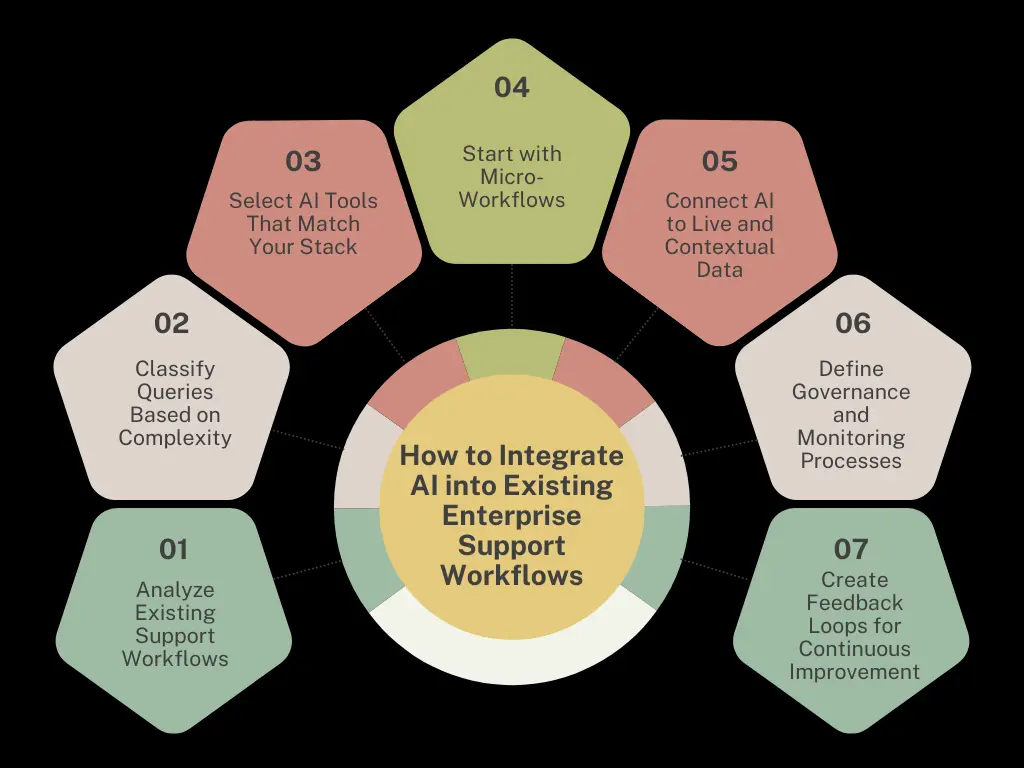
You need to analyze your existing processes, identify areas where the AI integration process adds value, and roll it out to complement human agents. Below is a step-by-step approach to ensure successful AI integration in enterprise software development:
1. Analyze Existing Support Workflows
Begin by auditing your current support setup. This helps uncover repetitive tasks, response bottlenecks, and inefficiencies in ticket handling. Focus on how customer issues are received, routed, resolved, and escalated.
Key steps include:
- Mapping the end-to-end support process.
- Identifying tasks that are repetitive or rules-based.
- Documenting handoff points between tools, teams, and systems.
This groundwork provides the context needed to determine where AI can fit without disrupting current operations, aligning with Agentic AI system architecture principles.
2. Classify Queries Based on Complexity
AI should not handle everything. To avoid performance issues or user frustration, classify support queries into levels of complexity.
For example:
- Simple queries: FAQs, password resets, account updates.
- Moderate queries: Refund requests, billing errors, delivery issues.
- Complex queries: Policy exceptions, legal matters, emotional complaints.
AI works best when deployed on routine, repetitive questions. More nuanced cases should be routed to human agents who can apply judgment and empathy. This classification supports AI chatbot integration best practices.
3. Select AI Tools That Match Your Stack
Choosing AI solutions that work well with your existing support infrastructure is critical. The AI should integrate easily without major redevelopment, whether you’re using Salesforce, Zendesk, Freshdesk, or a custom platform.
When selecting tools, consider:
- Compatibility with your CRM and knowledge base.
- Support for omnichannel inputs (chat, email, voice).
- Features like natural language understanding and contextual recall.
Avoid tools that operate in silos or require replacing core systems. Seamless integration with best AI/ML enabled data integration software for enterprises leads to quicker adoption and better results.
4. Start with Micro-Workflows
Instead of going for a full rollout, begin small. Pick one or two micro-tasks where AI can make an immediate impact.
Ideal starting points:
- Auto-tagging incoming tickets.
- Routing queries to the correct department.
- Summarizing support conversations for faster resolution.
This phased approach allows you to test AI’s accuracy, gather feedback, and refine workflows before scaling further, following AI integration best practices for enterprises.
5. Connect AI to Live and Contextual Data
A static knowledge base isn’t enough. For AI to provide relevant, real-time answers, it must access current documentation, product updates, and system data.
Best practices include:
- Syncing AI with dynamic knowledge sources like help articles, FAQs, and internal tools.
- Enabling role-based access so responses differ for customers, agents, or partners.
- Using grounding techniques to link AI outputs directly to your source data.
This helps prevent hallucinations and improves trust in AI-generated responses, in line with how to integrate AI into enterprise software guidelines.
6. Define Governance and Monitoring Processes
Once deployed, AI needs continuous supervision to maintain quality. Set up internal roles to monitor performance and ensure responsible use.
Key elements to track:
- Accuracy of AI-generated responses.
- Escalation rate to human agents.
- Impact on agent productivity and customer satisfaction.
Governance ensures the system evolves with business needs while staying compliant with internal and external standards, a vital step in your AI implementation roadmap for enterprises.
7. Create Feedback Loops for Continuous Improvement
Lastly, make feedback part of the workflow. Allow agents to flag incorrect responses, suggest better replies, or fine-tune prompts.
How to do this:
- Embed thumbs-up/down ratings within support tools.
- Let agents edit AI-suggested replies before sending.
- Periodically retrain the model using feedback data.
Over time, these feedback loops lead to smarter AI, better accuracy, and a stronger human-machine collaboration – key to how to integrate generative AI effectively.
Also Read: AI Workflow Builder: Transforming Business Automation in 2025
Best Practices for Successful AI Integration in Enterprises
You need a structured and practical approach to make AI work effectively in your support workflows. Below are key AI integration best practices for enterprises that help you reduce friction, ensure long-term value, and support your team through the change.
1. Start Small with a Clear Use Case
Begin with one support process where AI can deliver fast, measurable results, such as ticket classification, FAQ handling, or password resets. A narrow scope keeps the risk low and helps you build proof of value before scaling.
2. Involve Cross-Functional Teams from the Start
Your support agents, IT, legal, and CX teams all play a role in AI integration. Engage them early and often. Their input will shape smarter workflows and prevent roadblocks. Provide training so your team understands the tool and trusts the output.
3. Prioritize Data Privacy and Compliance
AI systems often work with sensitive customer and business data. Ensure your tools meet compliance requirements such as GDPR, HIPAA, or SOC 2, based on your sector. Use encryption methods like AES-256 and privacy-preserving techniques like differential privacy to secure user data.
4. Choose Tools That Fit Your Workflow
Pick AI tools that support your existing ITSM systems through APIs, pre-built integrations, or plug-ins. Whether you’re using ServiceNow, Zendesk, Salesforce, or Microsoft Teams, your AI platform should enhance, not replace, your existing setup. This helps your team work in familiar environments while improving speed and accuracy.
5. Track Metrics That Show Real Impact
Measure how AI affects your support goals. Monitor KPIs like ticket deflection, first response time, average resolution time, and customer satisfaction scores. These indicators will help you adjust processes and improve over time.
6. Keep Improving Through Iteration
AI isn’t plug-and-play. Your models need regular updates and feedback to stay accurate and helpful. Use resolved tickets, agent feedback, and changing customer needs to retrain your systems. Treat AI integration as an ongoing process, not a one-time setup.
How Wizr AI’s Capabilities Enable Seamless Enterprise AI Integration
Wizr AI helps enterprises integrate AI into existing support systems and workflows, enabling rapid deployment of AI-driven solutions without overhauling their infrastructure. This aligns with the AI integration process changes enterprises face today when implementing modern solutions, combining Enterprise AI Services with practical AI-powered automation and solutions.
- AI-Driven Ticket Automation: WIZR automates workflows such as ticket classification, tagging, and routing, ensuring that support requests are swiftly directed to the appropriate systems or teams. This automation reduces manual intervention, accelerates response times, and enhances efficiency – key factors in how to integrate AI into enterprise workflows smoothly.
- Real-Time Conversational AI: Wizr AI’s conversational AI agents engage with users in real time, addressing queries, gathering context, and assisting with resolution. This capability ensures immediate assistance while enabling seamless escalation of complex issues, improving both user experience and team productivity. This demonstrates AI chatbot integration best practices leveraging agentic AI capabilities.
- Smart Knowledge Discovery: Leveraging AI, WIZR facilitates quick access to relevant information by analyzing enterprise data, documentation, and historical interactions. This intelligent knowledge discovery empowers agents to resolve issues promptly and accurately, enhancing service quality while following AI integration best practices for enterprises.
- Compliance and Security Built-In: WIZR meets enterprise-grade security and compliance standards. These measures ensure that your data is protected, support regulatory requirements, and instill confidence across enterprise operations – essential for any AI implementation roadmap for enterprises.
- Smooth System Integration: WIZR integrates effortlessly with your existing ITSM tools, CRMs, and internal applications. Its flexible architecture enables smooth data exchange across systems, ensuring cohesive workflows without disruption aligned with modern enterprise AI integration approaches.
With WIZR, integrating AI into your enterprise workflows becomes a strategic initiative supported by Enterprise AI Services and AI-powered solutions that enhance efficiency, governance, and scalability while maintaining compatibility with your existing systems.
Conclusion
Manual workflows are no longer sufficient to meet the growing demands of enterprise operations. To stay competitive, businesses need more intelligent and efficient solutions. Integrating AI offers a clear path forward, enabling teams to improve productivity, reduce costs, and accelerate outcomes. However, successful adoption requires a structured approach aligned with enterprise systems and governance.
Wizr AI provides Enterprise AI Services and AI-powered solutions to help enterprises integrate AI into their support workflows effectively. With pre-built AI agents, agentic workflow automation, expert AI services, and seamless integration with existing systems, Wizr helps businesses enhance efficiency and deliver exceptional customer experiences. Whether you’re in customer support, IT service management, or other enterprise functions, Wizr offers tailored solutions to meet your needs – key considerations for AI integration best practices for enterprises.
Ready to transform your support workflows with AI? Contact Wizr today and discover how we can help you achieve smarter, more efficient operations through proven enterprise AI integration software.
FAQs
1. What is the best approach to integrate AI into enterprise software?
The best approach to integrate AI into enterprise software is to start with clear, high-impact use cases, involve cross-functional teams, and prioritize data privacy and compliance. Aligning AI integration with your existing system architecture ensures seamless workflow adoption without disruption.
Wizr AI provides Enterprise AI Services and AI-powered solutions that integrate into existing workflows, enabling faster adoption without major infrastructure changes.
2. How can enterprises manage AI integration process changes effectively?
Enterprises can manage AI integration changes by monitoring KPIs, updating models based on user feedback, and maintaining clear communication between IT, support, and CX teams. Following AI integration best practices, including training and security protocols, helps minimize disruption.
Wizr AI supports continuous workflow optimization through AI-driven insights and Enterprise AI Services, helping enterprises scale AI effectively.
3. What are the key AI chatbot integration best practices for enterprise support?
AI chatbot integration works best when it supports real-time conversation, accurately recognizes intent, and provides seamless escalation paths for complex queries. Incorporating an Agentic AI framework ensures responsiveness and contextual understanding.
Wizr AI’s conversational AI agents integrate into enterprise workflows, delivering real-time support with enterprise-grade security.
4. Why is choosing the best AI/ML-enabled data integration software important for enterprises?
Selecting reliable AI/ML data integration software ensures smooth data exchange across platforms, scalable AI adoption, and secure handling of sensitive information. Strong integration software accelerates deployment and unlocks the full potential of AI.
Wizr AI supports integration across enterprise systems through AI-powered solutions, enabling automation and data-driven decision-making.
5. How should enterprises integrate generative AI into existing workflows?
Integrating generative AI requires updating your system architecture to handle AI-generated outputs, securing data, and following an AI implementation roadmap. This approach enhances knowledge discovery, automates complex tasks, and improves customer interactions without disrupting existing workflows.
Wizr AI enables enterprises to build agentic workflows that leverage generative AI for automation, insights, and decision support.
6. What’s the fastest route to integrate AI into existing enterprise systems?
The fastest route is to start with modular AI components that connect via APIs and plug-ins, enabling quick deployment without overhauling infrastructure. Prioritize high-impact workflows and automate repetitive tasks first to show measurable results quickly.
Wizr AI supports rapid deployment through pre-built AI agents, agentic workflows, and enterprise integration capabilities.
7. How can businesses ensure seamless AI workflow integration across departments?
Seamless AI workflow integration requires mapping existing processes, defining clear automation goals, and maintaining consistent data standards across departments. Regular training and cross-team collaboration help reduce friction and improve adoption.
Wizr AI enables enterprise-wide workflow orchestration across functions such as support, IT, and finance through AI-powered services and solutions.
About Wizr AI
Wizr AI helps enterprises build autonomous enterprises and accelerate product and software engineering with practical, production-ready AI. We help organizations automate business workflows, modernize legacy applications and digital platforms, and build intelligent AI solutions.
Our core services include Enterprise AI Services, AI-Powered Engineering & Legacy Modernization, AI Product Engineering, and AI Governance. We also leverage AI Assembly capabilities, including the Agentic AI Framework, Agentic Workflows, Security, and Integrations.
Through our AI solutions, including AI Agents, Pharma & Life Sciences AI, Oracle AI, and Salesforce AI, we help enterprises apply AI across business and technology needs.
See how we can help your enterprise move faster with AI. 👉 Talk to an AI Expert.

![Agentic AI vs AI Agents: Key Differences Every CIO Must Know [2025 Guide]](https://wizr.ai/wp-content/uploads/2025/07/Agentic-AI-vs-AI-Agents.webp)
![Agentic AI vs Traditional Automation: Why Enterprises Shift for Better CX [2025]](https://wizr.ai/wp-content/uploads/2025/06/Agentic-AI-vs-Traditional-Automation.webp)

![11 Real-World AI Agents Examples + Use Cases for Enterprises [2025]](https://wizr.ai/wp-content/uploads/2025/05/AI-Agents-Examples-Use-Cases.webp)